






Yono Games Download: What to Check Before Installing the APK


Yono Games attracts Indian players looking for card games, slots and other mobile gaming options. However, searching for the app may lead to several APK pages using similar names and logos. A file that installs successfully does not necessarily come from the expected publisher or remain unchanged.
Before installing the app, Indian users should verify the download source, APK details and requested permissions—especially when registration involves an OTP, KYC documents or UPI payments. This article covers the practical checks that matter before downloading Yono Games on an Android phone.
Table of contents


- Why Yono Games May Be Available as an APK
- Check the Website Before Downloading Yono Games
- Compare the APK Details Before Installation
- Keep Google Play Protect Active
- Review the Permissions Requested by Yono Games
- Protect OTP, UPI and Banking Information
- Check Payment Rules Before Adding Money
- Warning Signs Around a Yono Games APK
- What to Do If the App Behaves Strangely
- Check the APK Before Trusting the App
Why Yono Games May Be Available as an APK
APK stands for Android Package Kit. It is the file format used to install applications on Android phones.
Most users download apps directly from Google Play. However, some gaming platforms distribute their Android apps through a website instead. The user downloads the APK, gives the browser permission to install it and completes the installation manually. This is commonly known as sideloading.
An app may be distributed as an APK because it is unavailable on Google Play, restricted in certain regions or being updated directly by its publisher. However, third-party websites can also copy an app, change its contents and release it under a familiar name.
That is why the name yono games cannot confirm the source by itself. The icon and login screen may look convincing even when the file has come from an unrelated website.
Check the Website Before Downloading Yono Games
Start with the website address. Fake pages often use small spelling changes, extra hyphens or long subdomains that are easy to miss on a mobile screen.
A proper download page should give users enough information to identify the file and the organisation behind it. Look for:
- The current app version
- Approximate APK file size
- Date of the latest update
- Publisher or operator information
- Privacy policy and terms
- Working customer support details
The absence of one item does not automatically prove that a site is fake. However, a page that offers only a large “Download Now” button gives users very little information to verify.
The source of the link also matters. APK links shared through Telegram, WhatsApp, SMS or online groups should not be trusted automatically. Even a friend may forward a promotional message without checking where it leads.
Open the address in a browser and read the full domain before downloading. Avoid shortened links when the final destination is unclear.
Compare the APK Details Before Installation
The version number and file size shown on the download page should broadly match the APK received by the phone. A completely different filename, unexplained change in size or ZIP folder containing several unrelated apps deserves closer attention.
Android may show the app name and icon before installation. Compare them with the information on the website. If the details do not match, cancel the process rather than testing the file to see whether it works.
Extra care is needed when updating an existing yono games app. Android apps use digital signatures to confirm that updates come from the same developer. An update from another source may fail because it has been signed differently.
If that happens, do not remove security controls or download an “APK installer” offered by an unknown page. Return to the source used for the original installation and confirm whether a new version has actually been released.
Keep Google Play Protect Active
Google Play Protect checks apps installed through Google Play and can also scan software downloaded from other sources. It may display a warning, block a suspicious installation or recommend removing a potentially harmful app.
A website may tell users that the warning is “normal” and ask them to switch off Play Protect. That instruction should not be followed without understanding why the APK was flagged.
At the same time, an app receiving no warning is not guaranteed to be safe. Play Protect is one security layer, not a replacement for checking the domain, publisher and requested permissions.
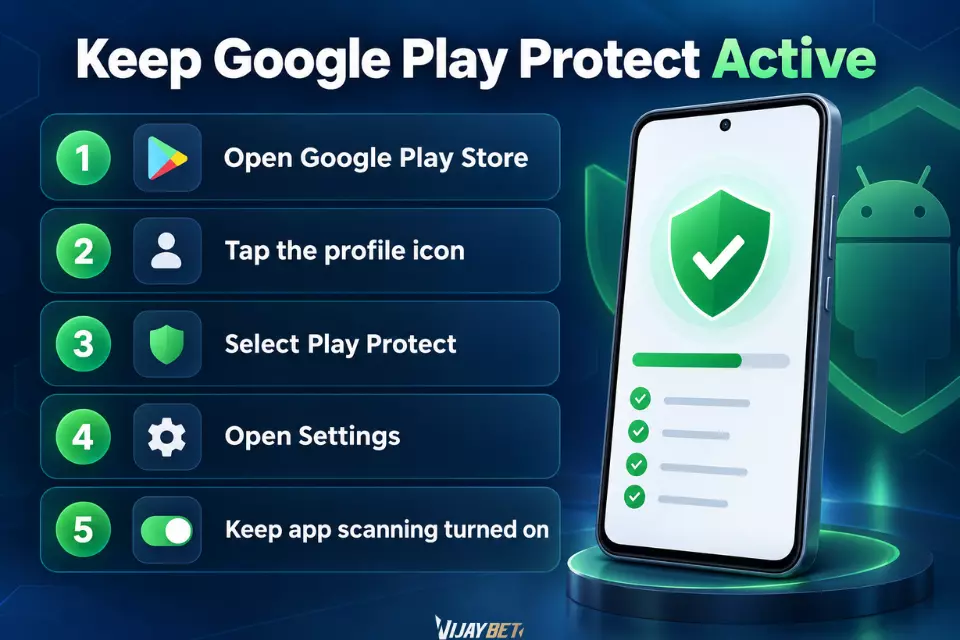
Users can review their Play Protect settings through Google Play:
- Open the Google Play Store.
- Tap the profile icon.
- Select Play Protect.
- Open Settings.
- Keep app scanning turned on.
Google publishes current instructions through its official Google Play Help Centre. Checking the official guidance is more reliable than following installation instructions copied into a promotional message.
A permission is not automatically suspicious. For example, camera or photo access may be required when uploading a KYC document. The important question is whether the permission matches a feature the user is actively trying to use.
Permission | Possible reason | Warning sign |
| Notifications | Account or payment updates | Constant promotional alerts with no clear option to stop them |
| Camera | Taking a photo for KYC | Camera access requested when no verification feature is being used |
| Photos and files | Uploading a document or profile image | Access to every file without a clear reason |
| Location | Checking regional availability | Precise location tracked continuously in the background |
| SMS | Detecting an OTP automatically | Full access to personal messages and banking alerts |
| Contacts and call logs | Rarely necessary for gameplay | Requested during installation without a related feature |
| Microphone | Voice support, if provided | Recording access requested when there is no voice function |
| Accessibility | Usually unnecessary for a gaming app | Used to read screens, control actions or approve prompts |
SMS and Accessibility permissions need particular attention. SMS messages may contain banking alerts and OTP codes, while Accessibility access can allow an app to observe or control activity on the screen.
If a permission has no connection to a feature being used, deny it first. Android allows users to change permissions later through:
Settings → Apps → Select the App → Permissions
Google also provides an official Android app-permission guide covering camera, contacts, files, location, microphone and SMS access.
Protect OTP, UPI and Banking Information
Account registration may involve an OTP sent to the user’s mobile number. That code should be entered only into the verified app or website where the login was started.
An OTP should not be shared with a supposed support agent through WhatsApp, Telegram, SMS or a phone call. Customer support also does not need a user’s:
- UPI PIN
- Debit or credit card PIN
- CVV
- Internet banking password
- Full card details
- Screen-sharing access
A common warning sign is urgency. Someone may claim that an account will be blocked, a withdrawal will be cancelled or a bonus will expire unless the user shares a code immediately.
Stop the conversation and contact support using the details published on the verified website. Do not use the phone number or link supplied by the person requesting the information.
Check Payment Rules Before Adding Money
APK safety and payment safety are related but separate issues. Even after confirming the app source, users should understand how deposits, bonuses and withdrawals work.
Before adding money, check:
- Minimum deposit and withdrawal amounts
- Available payment methods
- KYC requirements
- Bonus turnover conditions
- Withdrawal restrictions
- Possible fees
- Account-name requirements
Be cautious if support suddenly asks for money to be sent to a new personal UPI ID without an explanation. The payment instructions should be consistent with the process shown inside the verified app or website.
Keep a record of the transaction reference number, amount, date and confirmation screen. If a deposit is delayed, these details are more useful than a cropped screenshot showing only that money was sent.
A small test deposit can reduce immediate exposure, but it does not prove that every future payment or withdrawal will work. Avoid increasing the amount simply because the first transaction was processed successfully.
Warning Signs Around a Yono Games APK
Several warning signs appearing together are a good reason to stop the installation:
- The domain contains strange spelling changes
- No privacy policy or operator information is available
- The APK arrives through a temporary or shortened link
- The page promises guaranteed income
- Users are told to disable every Android security feature
- The app requests unrelated permissions immediately
- Support asks for an OTP, UPI PIN or screen sharing
- A deposit is demanded before account details can be checked
- The payee name changes repeatedly without explanation
Also pay attention to the overall website. If every menu item leads back to the same APK button, or important pages contain copied text and broken links, the platform has provided little evidence that users can rely on.
What to Do If the App Behaves Strangely
Unexpected behaviour may include heavy battery use, repeated pop-ups, unknown apps appearing on the phone or SMS messages being sent without the user’s knowledge.
If this happens:
- Disconnect the phone from the internet if sensitive activity is occurring.
- Remove unnecessary permissions from Android Settings.
- Run a Play Protect scan.
- Uninstall the app if the concern remains.
- Change important passwords from a different trusted device.
- Review recent bank and UPI transactions.
- Contact the bank or payment provider if financial details may have been exposed.
Do not download the same APK again from the same source until the problem has been identified.
Check the APK Before Trusting the App
Downloading Yono Games safely involves more than finding a page with the correct logo. The domain, APK details, Android warnings and requested permissions should all point to the same source.
Avoid letting a bonus or urgent payment message rush the decision. Readers comparing mobile gaming options through VijayBet should also check the relevant platform rules, local restrictions and payment conditions before registering or adding money. Gaming apps are meant for entertainment and should not be treated as a reliable source of income.

Read More
Yono Games Download: What to Check Before Installing the APK
India Online Gaming Ban Sparks Shutdowns, Industry Faces Billions in Losses
Vijaybet Banned? How to Know If Your Real-Money Gaming Platform Has Been Banned in India